Alfred Workflowで、AppleScriptを使ってFinderとPath Finderの現在開いているパスを取得する方法

AlfredのWorkflowを使っていると、FinderやPath Finderで開いているパスを取得して、そのパスに対してなにか操作したいときがあります。
今回はFinderとPath Finderそれぞれのパスの取得方法と、どちらかアクティブになっている方を取得する方法をまとめておきます。
AlfredのWorkflowでAppleScriptを使う方法
AlfredのWorkflowでAppleScriptを使いたいときは、Workflowの編集画面で右クリックして[Actions]→[Run NSAppleScript]を選択します。
下の画像のようなパネルが表示されます。
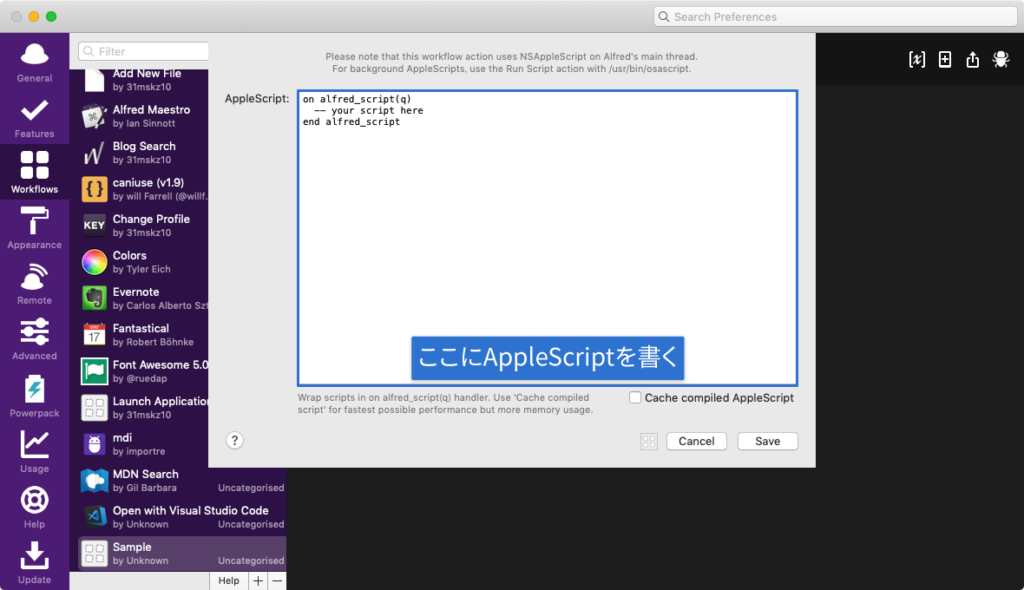
この中にAppleScriptを書いていくのですが、最初と最後の行は消すと動かなくなってしまうので、そのままにしておきます。
on alfred_script(q)
  -- your script here
end alfred_script
パスの取得方法
ここからパスの取得方法になります。
Finderのパス取得
Finderで現在開いているフォルダのパスを取得したい場合は下記のコードをコピペします。
on alfred_script(q)
  tell application "Finder"
    set pathList to (quoted form of POSIX path of (folder of the front window as alias))
    return pathList
  end tell
end alfred_script何故かreturnで返すと、パスの最初と最後に「'(シングルクォート)」が付いてしまい、後の操作のときに困ります。
2019年8月21日:追記
Twitterにて@MD5500さんよりquoted form ofの部分を消せばFinderのシングルクォーテーションは消えるとのご指摘いただきました。
なぜかシングルクォートがついてしまいますということですが、『quoted form of』を消せばいいのでは??
— MD5500 (@MD5500) August 21, 2019
on alfred_script(q)
  tell application "Finder"
    set pathList to POSIX path of (folder of the front window as alias)
    return pathList
  end tell
end alfred_script
全然気が付かず、「あれ?こんな仕様だったっけ?Alfred側の問題?」とか色々考えていましたが、ものすごく初歩的なミスでした。ご指摘ありがとうございます。
以降のコードに関しては、コピペがしやすいように該当部分を修正させていただきます。
【追記終了】
そこで、Run NSAppleScriptのあとに[Utilities]→[Replace]を追加して、シングルクォートを空白(何もなし)に置き換えています。
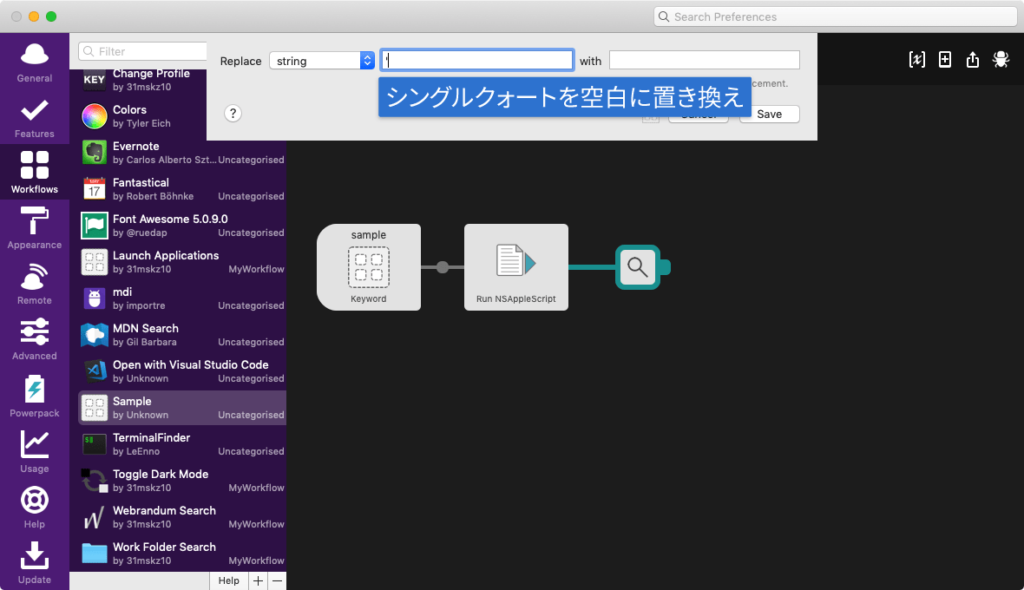
置き換えをしてしまうと、ファイル名にシングルクォートが付いている場合にうまく動作してくれなくなってしまいますが、ひとまず応急処置としてこのようにしています(Path Finderではシングルクォートが付かないので問題ない)。
もっとスマートなやり方ありましたら、ぜひアドバイスをお願いします。
Path Finderのパス取得
Path Finderで現在開いているフォルダのパスを取得したい場合は下記のコードをコピペします。
on alfred_script(q)
  tell application "Path Finder"
    set pathList to POSIX path of the target of the front finder window
    return pathList
  end tell
end alfred_script
Finderのパスを優先的に取得
基本的にはFinderで現在開いているフォルダのパスを取得しますが、Path Finderがアクティブなときのみ、Path Finderで現在開いているフォルダのパスを取得したい場合は、下記のコードをコピペします。
on alfred_script(q)
  tell application "System Events"
    set appName to name of the first process whose frontmost is true
  end tell
  if appName is "Path Finder" then
    tell application "Path Finder"
      set pathList to POSIX path of the target of the front finder window
      return pathList
    end tell
  else
    tell application "Finder"
      set pathList to POSIX path of (folder of the front window as alias)
      return pathList
    end tell
  end if
end alfred_script
Path Finderのパスを優先的に取得
基本的にはPath Finderで現在開いているフォルダのパスを取得しますが、Finderがアクティブなときのみ、Finderで現在開いているフォルダのパスを取得したい場合は、下記のコードをコピペします。
on alfred_script(q)
  tell application "System Events"
    set appName to name of the first process whose frontmost is true
  end tell
  if appName is "Finder" then
    tell application "Finder"
      set pathList to POSIX path of (folder of the front window as alias)
      return pathList
    end tell
  else
    tell application "Path Finder"
      set pathList to POSIX path of the target of the front finder window
      return pathList
    end tell
  end if
end alfred_script
取得したあとの処理
取得したあとは、アクションの中に{query}と入力すれば、そこにパスが入ります。
もし、そのままAppleScriptの処理をしたい場合はpathList変数にパスが入ってあるので、それを使用してください。